How To Delete A Product Category?
How To Delete A Product Category?
To 'Delete a Product Category', from the store dashboard go to:
> Products > Product Categories
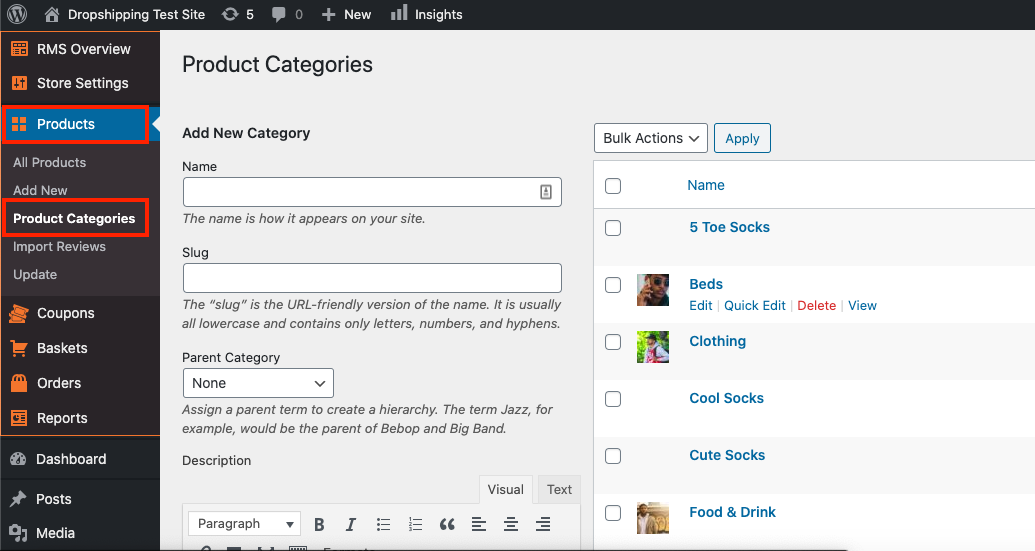
From within this page on the right hand side, hover your cursor over a 'Product Category' that you'd like to delete, and click 'Delete'.
(*Don't forget to click 'Save Changes' after making alterations*)
Related Articles
Product customization
Product customization You can edit titles, images, descriptions, shipping options, unpublish or remove product variants, etc. To customize a product, go to the Products section in your WP admin area, select a product to edit, and make necessary ...Product Options
Product Options General In the General section you can check and customize general information about the product. Since the plugin imports products from AliExpress in US Dollar ($), it is set as the default currency. This currency may be changed to ...How To Add A New Product Category?
How To Add A New Product Category? To 'Add a new Product Category', from the store dashboard go to: > Products > Product Categories From within this page on the left hand side you'll see the heading 'Add New Category'. Underneath this heading you can ...How To Edit A Product Category?
How To Edit A Product Category? To 'Edit A Product Category', from the store dashboard go to: > Products > Product Categories From within this page on the right hand side you may click on a 'Product Category' to 'Edit' it. (*Don't forget to click ...How To Delete Products?
How To Delete Products? To delete 'Products', from the store dashboard go to: > Products > All Products From within this page there are a few different ways to delete your products:- Delete products individually: Hover your cursor over a product and ...