How To Add A New Product Category?
How To Add A New Product Category?
To 'Add a new Product Category', from the store dashboard go to:
> Products > Product Categories
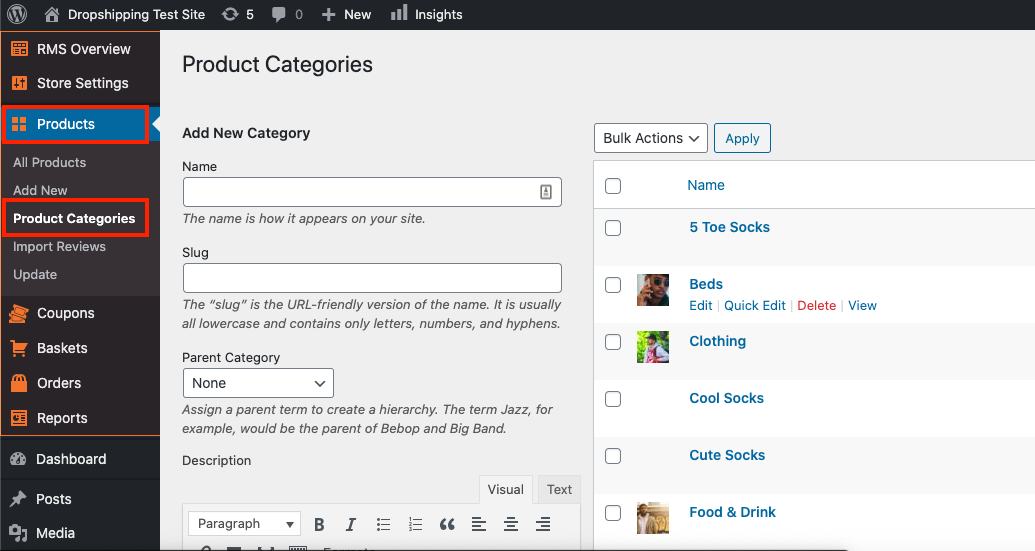
From within this page on the left hand side you'll see the heading 'Add New Category'. Underneath this heading you can add a 'Name', 'Slug', 'Parent Category', 'Description', allow the category to be 'Featured', add a 'Featured Image' and input various 'SEO' keywords/terms.
(*Once you've satisfied the relevant areas, don't forget to click 'Add New Category' at the very bottom*)
Related Articles
Product Options
Product Options General In the General section you can check and customize general information about the product. Since the plugin imports products from AliExpress in US Dollar ($), it is set as the default currency. This currency may be changed to ...How To Add/Remove Products To/From Product Categories?
How To Add/Remove Products To/From Product Categories? To add/remove 'Products' to/from 'Product Categories', from the store dashboard go to: > Products > All Products From within this page find the 'Product' that you'd like to add/remove to/from a ...How To Add AliExpress Images To My Product?
How To Add AliExpress Images To My Product? 1. Download this Google Chrome Extension. 2. Click this small icon at the top of your Google Chrome Browser and pin the 'AliSave Chrome Extension' (make the pin turn blue): 3. Log into your store backend ...How To Edit A Product Category?
How To Edit A Product Category? To 'Edit A Product Category', from the store dashboard go to: > Products > Product Categories From within this page on the right hand side you may click on a 'Product Category' to 'Edit' it. (*Don't forget to click ...How To Delete A Product Category?
How To Delete A Product Category? To 'Delete a Product Category', from the store dashboard go to: > Products > Product Categories From within this page on the right hand side, hover your cursor over a 'Product Category' that you'd like to delete, and ...