How To Change Site Logo/Favicon?
How To Change Site Logo/Favicon?
To alter the site logo and favicon, from the store dashboard go to:
> Store Settings > Store Settings > Branding
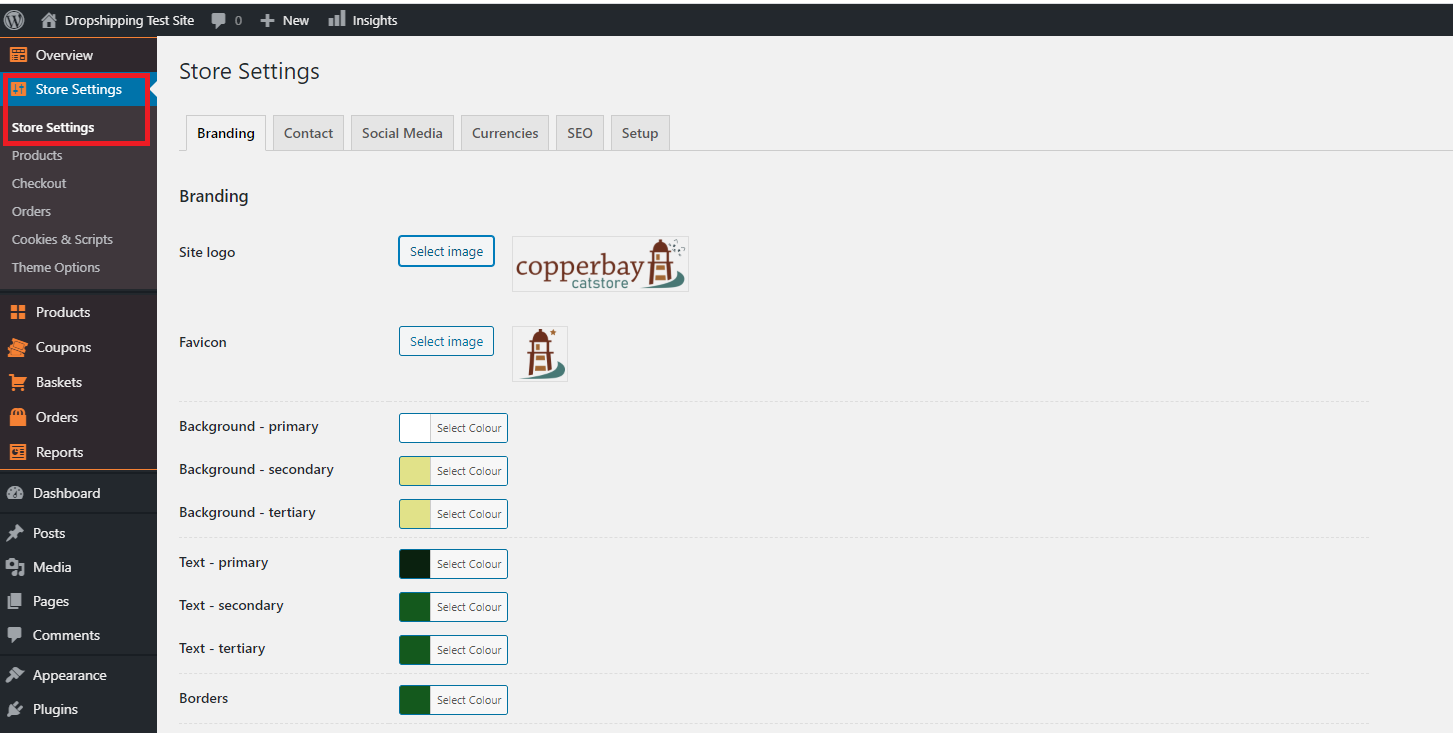
From within this page click 'Select image' to select files from your computer and upload them to replace the current 'Site logo' and/or 'Favicon'.
(*Don't forget to click 'Save Changes' after making alterations*)
Related Articles
How to Customize your site
How to Customize your site Go to Products => Product Categories and select categories you want to Edit or create a new one. To create a subcategory, add its name and select the corresponding parent category. Click Add a New Category. Once your ...Using your Ready Made Property Site
Using your Ready Made Property Site Welcome to Ready Made Property, where you can make fantastic commissions from selling property from your own Property Portal ready loaded with fantastic properties. From your Property Portal Control Panel you can ...Change Supplier
Change Supplier Sooner or later all dropshippers face a situation when some products are out of stock. Now with 'Change Supplier' option you may find the same product at another store and replace your old link with a new one. Please make sure your ...How To Change Currency Settings?
How To Change Currency Settings? To change the currency settings, from the store dashboard go to: > Store Settings > Store Settings > Currencies From with this page you can change the 'System currency', 'Default display currency' and 'Optional ...How To Change The Theme?
How To Change The Theme? To alter the 'Theme', from the store dashboard go to: > Store Settings > Store Settings > Setup From within this page, hover over a theme with your cursor and click 'Activate':