Welcome Email
Welcome Email
To access the 'Welcome Email Order Settings', from the store dashboard go to:
> Store Settings > Orders & Emails > Welcome Email
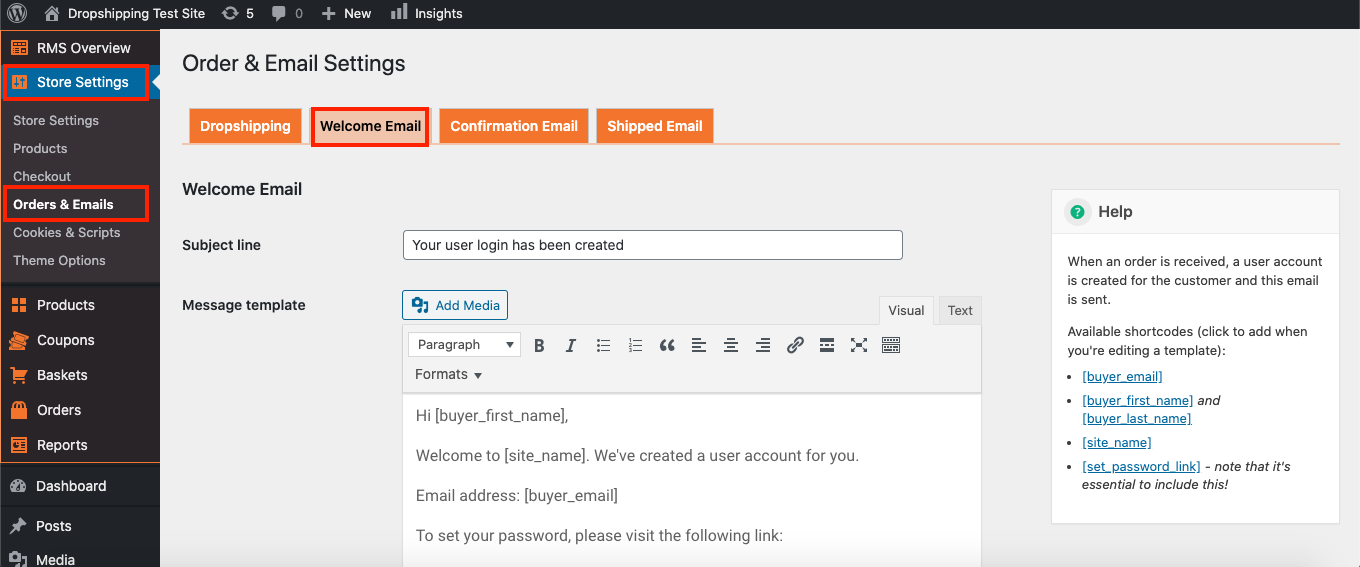
The 'Subject line' and 'Message template' will be sent off to your customers when they purchase from you and can be altered to your liking. *Use the 'Help' box on the right for more information*
(*Don't forget to click 'Save Changes' after making alterations*)
Related Articles
Confirmation Email
Confirmation Email To access the 'Confirmation Email Order Settings', from the store dashboard go to: > Store Settings > Orders & Emails > Confirmation Email The first setting at the top labelled 'BBC to' allows you to blind carbon copy the ...Shipped Email
Shipped Email To access the 'Shipped Email Order Settings', from the store dashboard go to: > Store Settings > Orders & Emails > Shipped Email The first setting at the top labelled 'BBC to' allows you to blind carbon copy the 'Shipped Email' to an ...Email Templates for Partners
Email Templates for Partners We have a series of email templates for you to adapt to your own Partner email marketing. The document is password protected, please raise a ticket for the password. docx EmailMarketingTemplates.docx 20.99 KBAbandoned Basket Email
Abandoned Basket Email 'Abandoned baskets' are a nuisance, but don't feel disheartened. According to research, customers on average think about buying the same product seven times before they buy. This is why retargeting to them is key, so that they ...How To Enable/Disable Email Marketing Signup Text At Checkout?
How To Enable/Disable Email Marketing Signup Text At Checkout? To switch the 'Marketing signup text' on/off, from the store dashboard go to: > Store Settings > Checkout > Marketing From within this page, the top tick-box labelled 'Show at checkout' ...