Tracking services
To set up tracking service for ‘Order shipped’ email notifications and your clients’ personal accounts, go to AliDropship → Settings → General → Tracking Service. Choose one of the implemented services, and Tracking ID will be attached to email notifications sent to your clients.

Your customers will be redirected to the website of the chosen tracking service when clicking the tracking number provided in ‘Order shipped’ email or checking order status in the Orders section of their personal accounts. Please note that 17track tracking service is used by default on the Tracking page of your website and can’t be changed.
If you want to attach tracking to ‘Order shipped’ notification and ‘My account’, leave this option turned off:

Sometimes Tracking IDs can be changed by the supplier, so if you want to keep your customers updated, enable the Send email notification if the tracking ID is changed option:

To edit this template, go to AliDropship → Settings → Notifications → Order tracking ID changed:

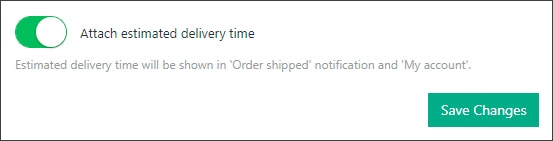
'Attach estimated delivery time’ option let you show in ‘Order shipped’ notification and ‘My account’ dates of delivery:
You can add custom URL for tracking orders:
Go to AliDropship → Settings → Notifications → 'Order shipped' notification:

Enter your custom tracking URL.
Let's see where to get this URL. For example I want to add custom tracking URL from Cainiao tracking service. Enter your Tracking ID and click Track:

Copy the selected part of the link: global.cainiao.com/detail.htm?mailNoList=UA926925855HK and paste it to the WP admin area: AliDropship → Settings → Notifications → 'Order shipped' notification.

Replace the Tracking number UA926925855HK with the tag {tip} – customers tracking ID will be added automatically to that link. Click Save Changes.

*If you use custom URL for tracking customers orders, Tracking ID will be sent in 'Order shipped' notification automatically no matter what settings you have here:

Related Articles
Tracking orders
Tracking Orders With the Tracking section, you can get a detailed information on order tracking and manage tracking details. Please keep in mind that Tracking displays only for orders that were already placed on AliExpress and got Order IDs. To get ...The 'Get tracking' button doesn't work.
The 'Get tracking' button doesn't work. The tracking info can be applied to the orders which have order numbers. It might happen when the order ID is not fetched from AliExpress (this most often happens due to some issues with the AliExpress server ...How To Setup Google Ads Conversion Tracking?
How To Setup Google Ads Conversion Tracking? To setup the 'Google Ads Conversion Tracking Tag', please follow the steps below. Step 1: Create a conversion action Sign in to your Google Ads account. In the top right-hand corner, click the tools icon , ...How to Integrate Google Analytics
How to Integrate Google Analytics Sign in to your Google Analytics account. Click Admin at the bottom of the page. Go to the Property section => Tracking Info. Click Tracking Code in the drop-down menu. Copy the script below Global Site Tag. Go to ...How To Manually Fulfil Product IDs?
How To Manually Fulfil Product IDs? To manually fulfil 'Product IDs', sign into your AliExpress.com account: After signing in, go to: > Account > My Orders From within this page you can find your 'Order IDs' here: After locating the correct 'Order ...