Tracking orders
With the Tracking section, you can get a detailed information on order tracking and manage tracking details. Please keep in mind that Tracking displays only for orders that were already placed on AliExpress and got Order IDs. To get started, go toAliDropship => Orders => Tracking.
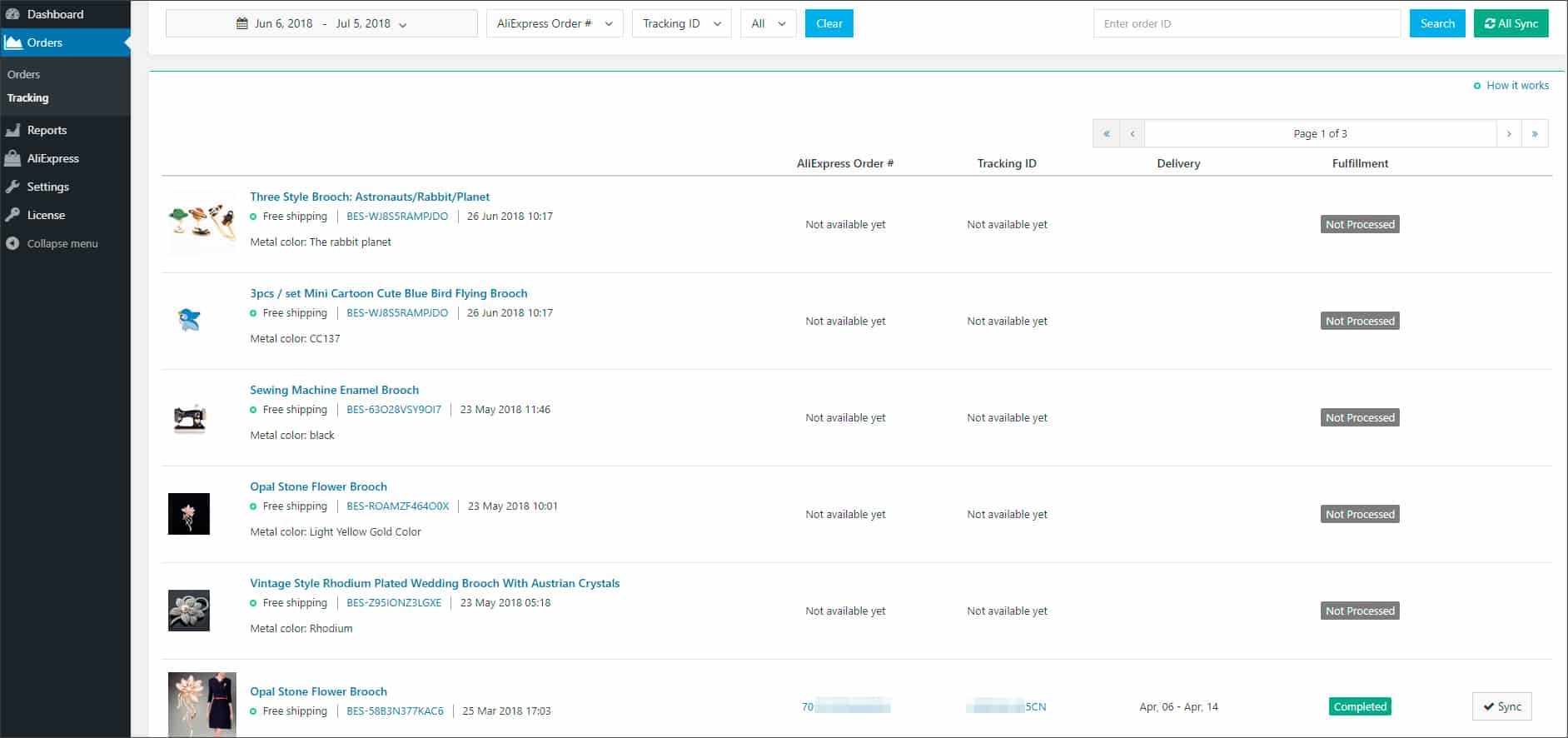
Enter order ID to learn more about a particular order or adjust your search filters: set time range using the Calendar feature and/or filter orders by Fulfilment, AliExpress Order # or Tracking ID. Click All Sync for the plugin to fetch the latest tracking information for all your orders from AliExpress. Please note that you need to be logged in AliExpress to be able to use this option.

To check purchase details in the Orders section of the plugin, click on the order ID.
Use the Sync button to check if there are any updates on tracking status (including Delivery time) available.
Tracking IDs are provided to your customers in shipping email notifications they receive after AliExpress seller shipped a package. Clients can track their orders by clicking the tracking ID in the email or checking the Tracking page on your website. They will be redirected to the website of a tracking service that you can choose in Tracking Service settings.
Click on AliExpress Order number to learn more about the order in your AliExpress account.

Related Articles
Tracking services
To set up tracking service for ‘Order shipped’ email notifications and your clients’ personal accounts, go to AliDropship → Settings → General → Tracking Service. Choose one of the implemented services, and Tracking ID will be attached to email ...Orders (Full Guide)
Orders (Full Guide) To see your 'Orders', from the store dashboard go to: > Orders From within this page you can see all the customers who placed an 'Order' with you and their status will be pooled at the top in various categories for quick and easy ...The 'Get tracking' button doesn't work.
The 'Get tracking' button doesn't work. The tracking info can be applied to the orders which have order numbers. It might happen when the order ID is not fetched from AliExpress (this most often happens due to some issues with the AliExpress server ...How to Process Orders from AliExpress
How to Process Orders from AliExpress Video Tutorial This guide explains how to fulfill customer orders by sending them to AliExpress through your WordPress admin panel. Prerequisites Before you can process orders, ensure you have: Administrator ...Processing Orders
Please note! In order to process your orders, you need to be registered with AliExpress and have your own AliExpress customer account. You can register here. It is optional to authorize your wordpress website in Alidropship Chrome Extension to place ...