The order number does not attached automatically. Why?
The order number does not attached automatically. Why?
It may happen that the order ID is not collected from AliExpress. It often happens due to the AliExpress server not reverting the requested information or lost connection between the website and AliExpress.
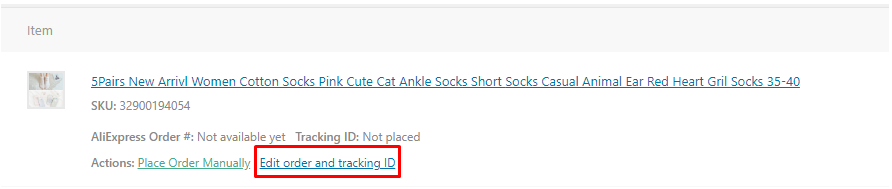
In that case, please use the 'Edit order and tracking ID' link to add the order ID from AliExpress manually.
Related Articles
Order fulfilment settings
With AliDropship plugin, it is possible to make the process of order fulfilment automated. You can adjust these settings in AliDropship → Settings → General. Activate the Mark order as 'Processed' option to make the plugin change order status from ...Dropshipping Order Settings
Dropshipping Order Settings To access the 'Dropshipping Order Settings', from the store dashboard go to: > Store Settings > Orders and Emails > AliExpress The top tick box labelled 'Mark as Complete' changes the order status to 'Complete', and sends ...I can't place the order
I can't place the order I don't have the Place Order Automatically button in my Wordpress. Normally, it should look like this: If you do not have this button, check the following: You are using the Google Chrome Browser The Alidropship Extension is ...Tracking services
To set up tracking service for ‘Order shipped’ email notifications and your clients’ personal accounts, go to AliDropship → Settings → General → Tracking Service. Choose one of the implemented services, and Tracking ID will be attached to email ...How To Bin A Order?
How To Bin A Order? To 'Bin a Order', from the store dashboard go to: > Orders From within this page, hover over a 'Order' and click 'Bin' to remove it. To 'Bin' in bulk, you can tick multiple 'Orders' checkboxes, then alter the 'Bulk Actions' drop ...