My IP Address Is Blocking My Access?
My IP Address Is Blocking My Access?
The FREE VPN Chrome Extension can be installed via this link.
Step 1: click the link above ^
Step 2: Click 'Add to Chrome' on the VPN Chrome Extension page
Step 3: Click 'Add Extension'
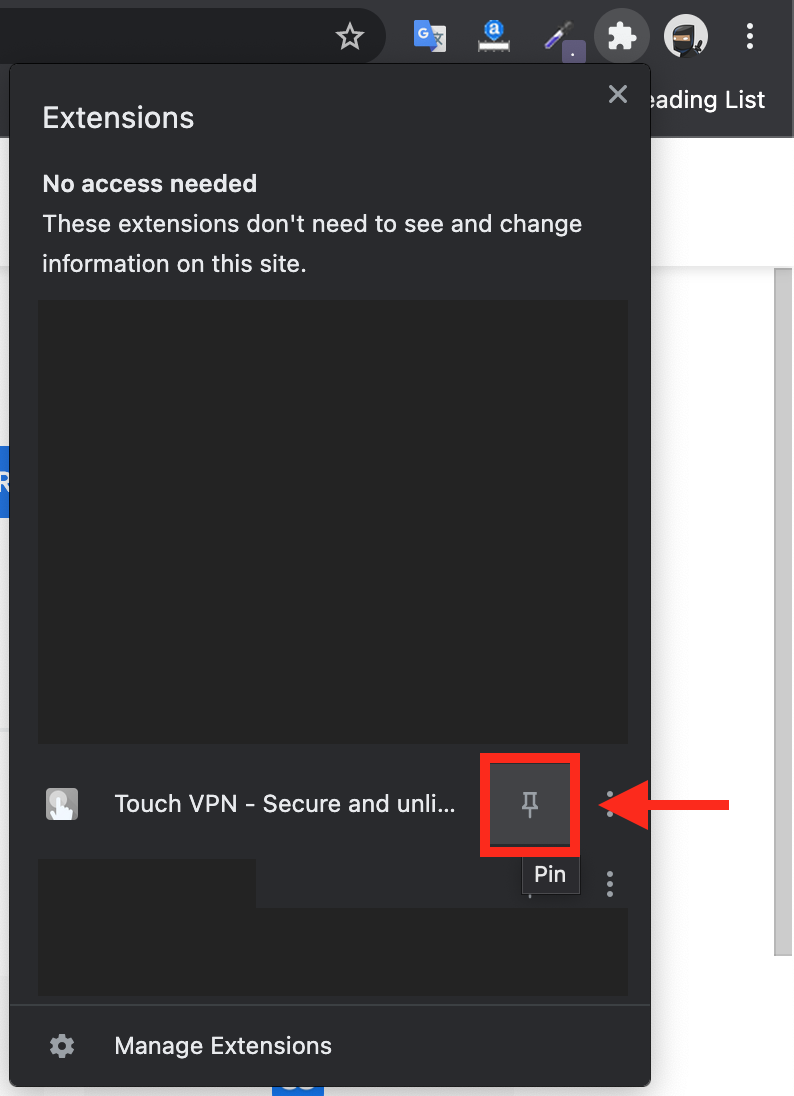
Step 4: Click the jigsaw icon in top right hand corner of your screen

Step 5: Find the VPN Icon in the drop-down list and click the pin icon to its right
The VPN Chrome Extension will now always appear in the top right hand side of your browser with you having to click the jigsaw icon
Step 6: Select the Free plan.
Step 6: Click the VPN icon in top right hand corner and follow the prompts to remain on the free version, then click on signup and close that screen
Step 7: Select the option you would like to connect to.
Step 8: Click on the Start button to connect.
Related Articles
My IP address is blocked
My IP Address Is Blocking My Access? The FREE VPN Chrome Extension can be installed via this link. Step 1: click the link above ^ Step 2: Click 'Add to Chrome' on the VPN Chrome Extension page Step 3: Click 'Add Extension' Step 4: Click the jigsaw ...How To Access Conversion Scripts?
How To Access Conversion Scripts? To access the 'Conversion Scripts', from the store dashboard go to: > Store Settings > Cookies & Scripts > Conversion Scripts (*Don't forget to click 'Save Changes' after making alterations*)How To Access Standard Scripts?
How To Access Standard Scripts? To access the 'Standard Scripts', from the store dashboard go to: > Store Settings > Cookies & Scripts > Standard Scripts (*Don't forget to click 'Save Changes' after making alterations*)Confirmation Email
Confirmation Email To access the 'Confirmation Email Order Settings', from the store dashboard go to: > Store Settings > Orders & Emails > Confirmation Email The first setting at the top labelled 'BBC to' allows you to blind carbon copy the ...Connecting BlueSnap account
Connecting BlueSnap account You can start with test payments before your Merchant Application is approved. Create your sandbox account You will receive email with verification link -> click it: Log in your sandbox account and go to API settings: ...