How do I backup my site?
How do I backup my site?
Step 1: Download the All-in-One WP Migration plugin
Step 2: Log into your Wordpress dashboard and go to:
> Plugins > Add New > click 'Upload Plugin' (top of page)
Step 3: Click 'Choose file' and choose the All-in-One WP Migration plugin you just downloaded
Step 4: Activate the plugin
Step 5: Go to: > All-in-One WP Migration > Export
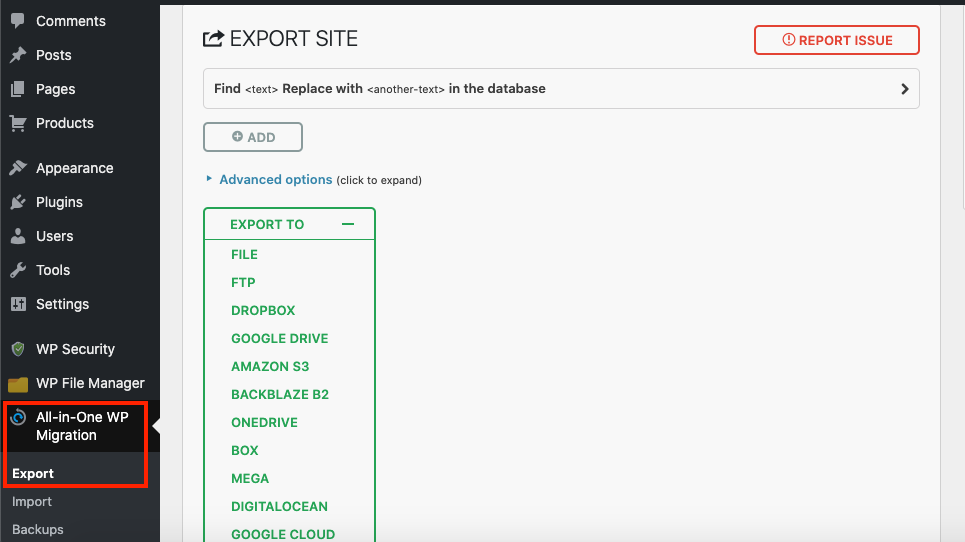
Step 6: Click 'EXPORT TO' and select 'FILE'
Step 7: It will then generate the WordPress backup. Click the download link once it completes.
Related Articles
How Do I Backup My Site?
How Do I Backup My Site? Step 1: Download the All-in-One WP Migration plugin Step 2: Log into your Wordpress dashboard and go to: > Plugins > Add New > click 'Upload Plugin' (top of page) Step 3: Click 'Choose file' and choose the All-in-One WP ...About your site
About your site The use of our tools is totally free. They become available immediately after you register. Unlike traditional booking systems, we don’t charge anything to connect you to the network. Commissions from suppliers are 7% to 20%, ...How To Change Site Logo/Favicon?
How To Change Site Logo/Favicon? To alter the site logo and favicon, from the store dashboard go to: > Store Settings > Store Settings > Branding From within this page click 'Select image' to select files from your computer and upload them to replace ...How to Customize your site
How to Customize your site Go to Products => Product Categories and select categories you want to Edit or create a new one. To create a subcategory, add its name and select the corresponding parent category. Click Add a New Category. Once your ...Extension error: Please authorize your site
Extension error: Please authorize your site To start importing products you need first to authorize your site in the Alidropship Google Chrome extension. Click on AliDropship extension icon and Log in. If the authorization does not work or it works ...