Extension error: Please authorize your site
To start importing products you need first to authorize your site in the Alidropship Google Chrome extension.
Click on AliDropship extension icon and Log in.

If the authorization does not work or it works but you still can't import products, take the following actions:
1. First and foremost check the Permalinks in General settings of your Wordpress. They must be set to POST NAME only.
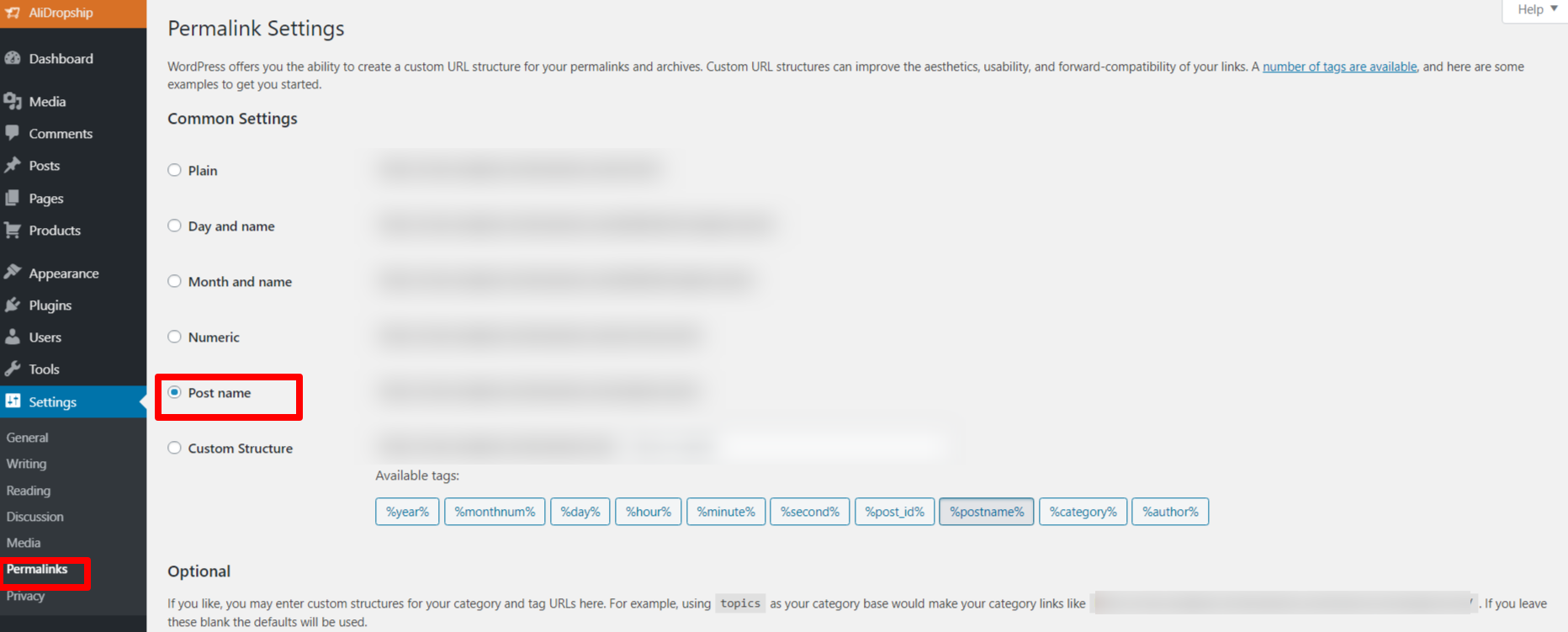
2. Make sure that you are using the latest versions of AliDropship plugin, theme and AliDropship Google Chrome extension.
3. Go to your WordPress admin area -> Plugins -> Deactivate ALL third-party plugins, especially security plugins like WP Cerber, All-in-one Security, etc., cache plugins like Autoptimize, etc.
4. Clear the cache of your Google Chrome browser or reinstall the Chrome browser.
5. Deactivate ALL third-party extensions (for example AdBlock, VPN extensions, etc.)
Related Articles
Guide 1: Install & Authorize RMS Chrome Extension
Guide 1: Install & Authorize RMS Chrome Extension The RMS Chrome Extension can be installed via this link. Follow the steps below in the video to install and authorise the RMS Chrome Extension: Steps in written format: 1. Click this link and open it ...Guide 1: Install & Authorize RMS Chrome Extension
The RMS Chrome Extension can be installed via this link. Follow the steps below in the video to install and authorize the RMS Chrome Extension: Steps in written format: 1. Click this link and open it in Google Chrome. 2. Click the blue 'Add to ...Setting up Google Chrome Extension
Setting up Google Chrome Extension To make AliDropship plugin work properly, you need to install and activate AliDropship Google Chrome extension. It allows you to: add products and reviews to your site directly from AliExpress edit product before ...About your site
About your site The use of our tools is totally free. They become available immediately after you register. Unlike traditional booking systems, we don’t charge anything to connect you to the network. Commissions from suppliers are 7% to 20%, ...Using your Ready Made Property Site
Using your Ready Made Property Site Welcome to Ready Made Property, where you can make fantastic commissions from selling property from your own Property Portal ready loaded with fantastic properties. From your Property Portal Control Panel you can ...