PayPal Classic Integration
PayPal Classic Integration
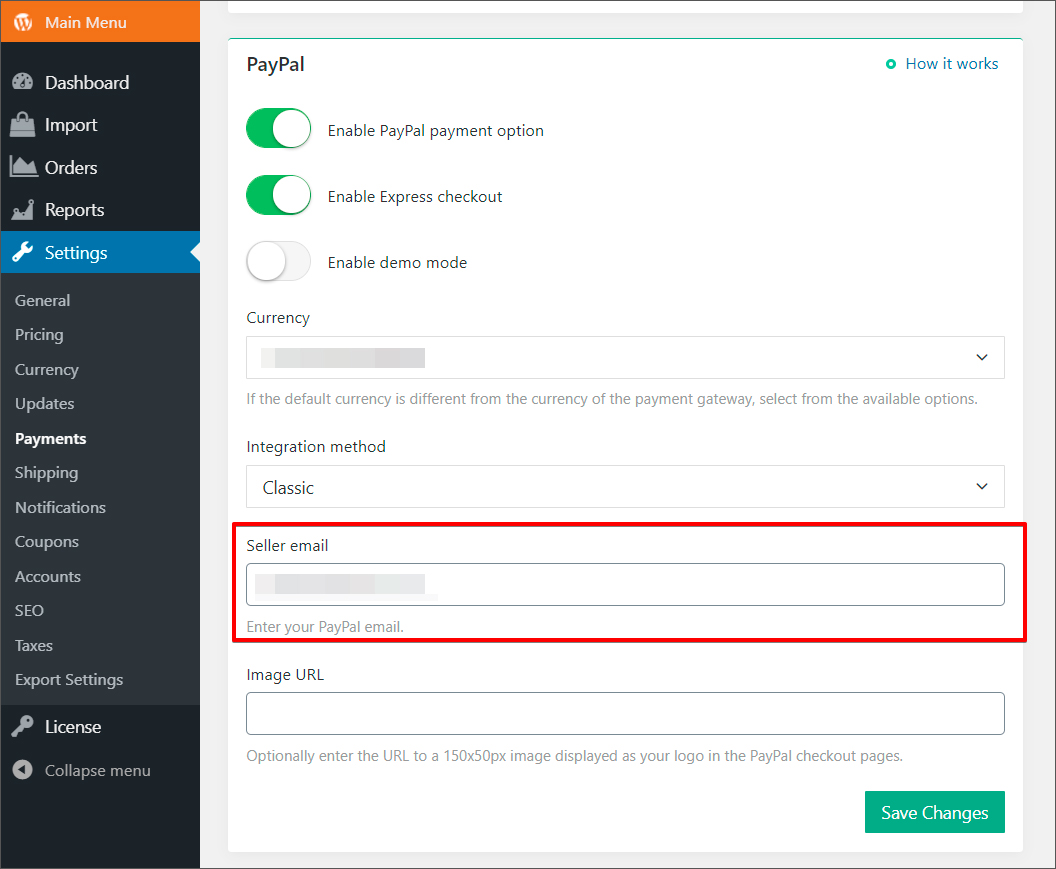
Go to AliDropship -> Settings => Payments to enable PayPal as your payment gateway.
Change Currency to US Dollar ($).
If you are from the UK, please set as British Pound Sterling (£).
Add your PayPal email -> click 'Save changes'.
Related Articles
Connecting PayPal Account
Connecting PayPal Account There are two possible options to connect your PayPal account - Option 1: Classic integration) and Option 2: API REST V1. We recommend trying Classic first. In case you have issues with getting payments through this ...PayPal API REST V1 Integration
PayPal API REST V1 Integration Log in PayPal developer account at https://developer.paypal.com using your usual PayPal login credentials. Go to 'My Apps and Credentials' and select 'Live' (live keys). 'Add App name (it could be anything: e.g. your ...How To Link & Register FNB To PayPal?
How To Link & Register FNB To PayPal? You would need to register for a FNB online profile at www.fnb.co.za , if you are not banking with FNB, choose the “For PayPal for non FNB customers” , once the FNB online profile is setup and approved you can ...How To Integrate PayPal Payment Gateway?
How To Integrate PayPal Payment Gateway? To integrate the PayPal payment gateway: I. From the store dashboard go to: > Store Settings > Checkout > General II. Under the 'Address' heading, check the tick-box labelled 'Show postcode/ZIP Code field': ...How Do I Return Or Refund A Customer?
How Do I Return Or Refund A Customer? AliExpress has a strong buyer protection system with full money back guarantee. So, if your customer is not satisfied with a product or did not receive it and asking for a refund, we would recommend getting in ...