How To Import Product Reviews
To 'Import Product Reviews', from the store dashboard go to:
> Products > Import Reviews
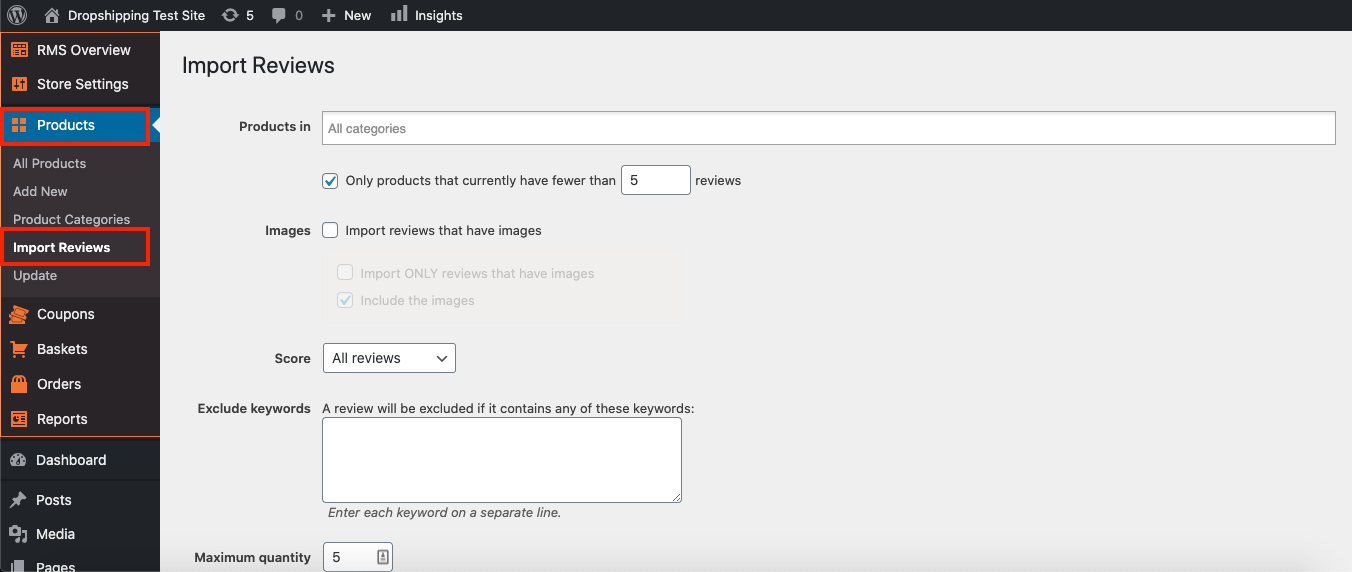
From within this page there are many different options and criteria to choose from when 'Importing Reviews':-
Products in: whichever categories are selected here will be the ones product reviews will be imported to. Select no categories to import reviews to all categories/all products.
Only products that currently have fewer than X reviews: ticking the box and inputting a number, for example 5, will only import reviews to those products that have fewer than 5 reviews.
Import reviews that have images: tick this box to import reviews from products that have images.
- Import ONLY reviews that have images: tick this box to only import reviews with images.
- Include the images:
Score: import 'All reviews', '2 or more stars', '3 or more stars', '4 or more stars' or '5 stars only'
*We recommend either '3 or more stars', or '4 or more stars' to make your reviews look legitimate*
Exclude keywords: a review will be excluded if it contains any of these keywords.
Maximum Quantity: set a maximum quantity of reviews per product from 1 to 99.
Approval: if imported reviews are set to 'Draft', you will need to manually Publish them before they will be visible on the site.
(*Don't forget to click 'Import Reviews' when you're happy with the settings*)
Related Articles
Importing reviews
Before proceeding further, Authorize the AliExpress API. To authorize your AliExpress API, please go to AliDropship (in the orange box) → AliExpress Login → click Login → Get Code If you are already logged in to your AliExpress account, you will be ...Product Options
Product Options General In the General section you can check and customize general information about the product. Since the plugin imports products from AliExpress in US Dollar ($), it is set as the default currency. This currency may be changed to ...How To Edit Product Reviews?
How To Edit Product Reviews? Note: product reviews are gathered from customers who purchased your products on AliExpress. There are 2 main methods of editing product reviews:- Editing specific product reviews:- From the store dashboard go to: > ...How To Enable/Disable Product Reviews On Product Pages?
How To Enable/Disable Product Reviews On Product Pages? To switch 'Product Reviews' on/off on product pages, from the store dashboard go to: > Store Settings > Products > Reviews From within this page, the top tick-box labelled 'Show Reviews' will ...Import Products from AliExpress
NOTE! You need to check: If you are using the latest version of AliDropship: https://alidropship.com/updates-plugin. If your site's default currency, the default database currency, and the currency on AliExpress are the same! Step 1. Install ...