Coupons
Using coupons can be a powerful marketing tool for your dropshipping online store. If you want to create a coupon, go to AliDropship → Settings → Coupons and click the Add New button.
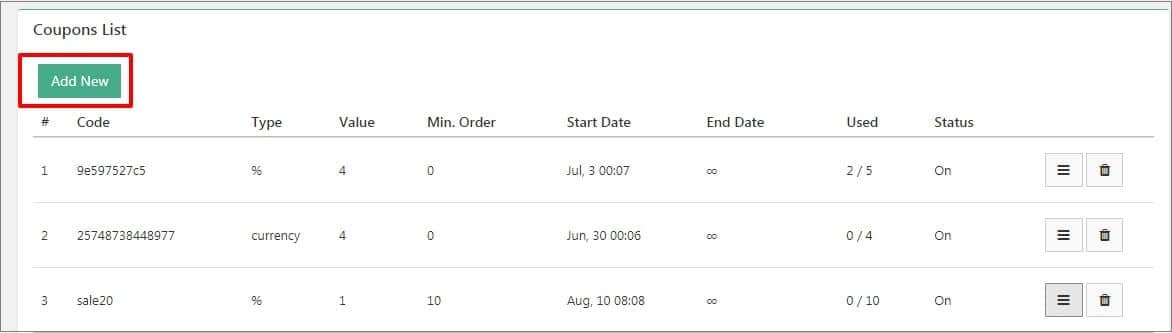
Enable a coupon and change its name if you want.

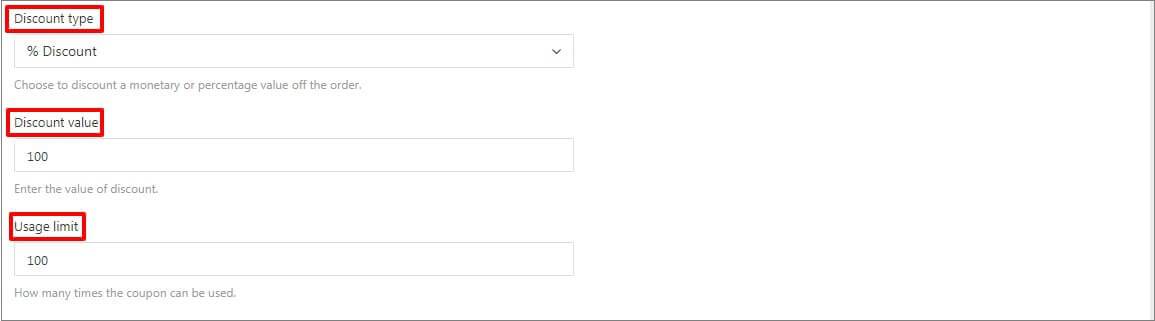
To set the value of your discount, first choose the discount type (% Discount or $ Amount), and then enter a percentage or monetary value for the discount.
You can specify how many times you want this coupon to be used by entering a number in the field Usage limit.
If you want the coupon to be used only by definite customers, activate the following option and enter their email addresses divided by semicolon:

It is possible to set a minimum order amount for a coupon. For example, you can use this option if you want the coupon to be used only in case your customer’s total purchase reaches $10 e.g. Coupon will be applied on checkout when the minimum order amount is reached.

If you want coupon is applied automatically, enable the toggle:

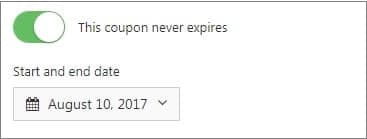
You can set the Start and End dates for your marketing campaign, on which a coupon will be valid. Otherwise, you can select Never expires option to make your discount offer run permanently.
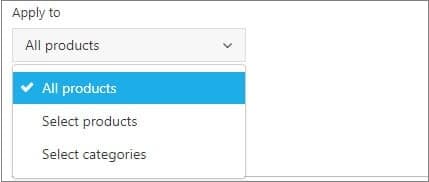
You can select which products a coupon can be applied to. There are 3 options:
to all products
to selected products
to selected categories
You can enable option to apply a coupon both to product and shipping costs. Click Save Changes to save settings.

Related Articles
How To Create Coupon Codes?
How To Create Coupon Codes? Before you create 'Coupon Codes', please ensure that you have enabled the 'Coupon Code Field'. Once this tick box is enabled, to create 'Coupons', from the store dashboard go to: > Coupons > All Coupons Click 'Add New' at ...How To Enable/Disable Coupon Code Field?
How To Enable/Disable Coupon Code Field? To enable the 'Coupon code field', from the store dashboard go to: > Store Settings > Checkout > General From within this page the top tick box labelled 'Show coupon code field' gives you the option to enable ...